Pages

Showing posts with label Dynamics AX. Show all posts

Thursday, June 4, 2015

AX 2012 Enterprise Portal: Create SSRS Report for EP

Noted:  This content is based on AX 2012 R2 + CU7 


It's been really long time, right?   I was so busy with company's projects and focused on other modules instead of Retail.  These days, I have to do Enterprise Portal with showing SSRS report.  Someone asks me to prepare guideline for colleagues.  So, just have idea to write in here too.    

Scenario: 

Create new SSRS Report to show on Enterprise Portal.  

Pages: 

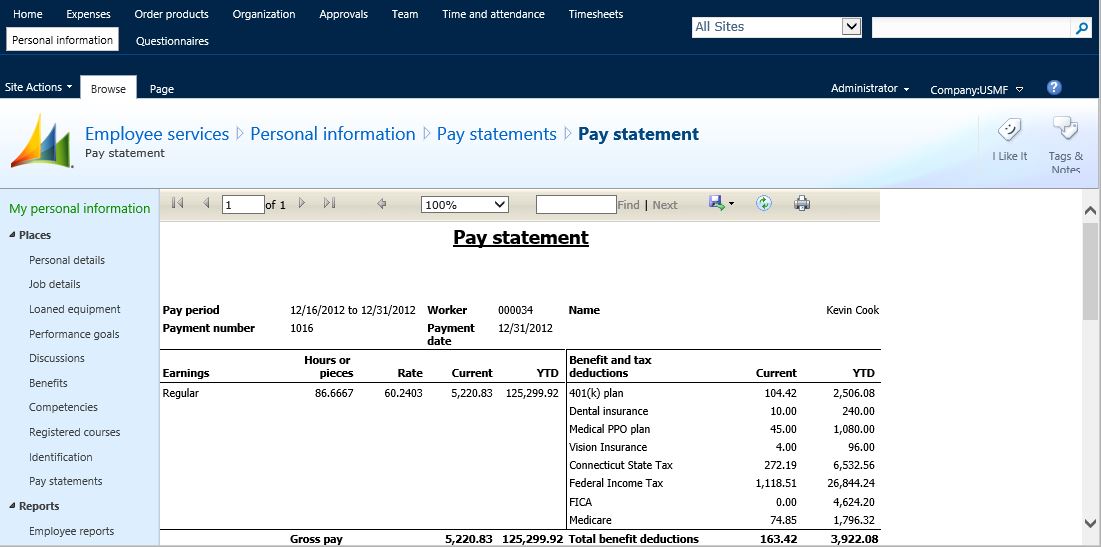
Payroll Pay Statement is simplest example to start with.   

  • Go to:  Employee Services > Personal infomation > Pay stetements

To have SSRS on EP, there are 2 main pages

  • List page for sending report parameters


  • SSRS Viewer page  


Prepare SSRS Report: 


  • Temporary table 
    • TableType = InMemory
  • Report Data Provider Class (DP) 
    • Extends SRSReportDataProviderBase
  • Output MenuItem
    • RunOn = Server


Report Viewer: 

Web Control to support Report Viewer must extend AxBaseUserControl.  Set Output MenuItems in AxReportViewer.    

      <dynamics:AxReportViewer runat="server" ID="MyReport" MenuItemName="PayrollEPWorkerPayStatement" /> 

In code behind, page_init method.   Send parameters to report.  Below is example when parameter is from RecId. 

        protected void Page_Init(object sender, EventArgs e)
    {
        Dictionary<string, object> parms = new Dictionary<string,object>();

        int tableId = AxQueryString.GetCurrent(Page).WTID;
        KeyValuePair<int, string> kv1 = ControlHelper.DecryptWKEY(AxQueryString.GetCurrent(Page));

        Int64 payStatementRecId = 0;

        if (kv1.Value != null)
        {
            payStatementRecId = Int64.Parse(kv1.Value, CultureInfo.InvariantCulture);
        }

        // Add params required for report when accessed from EP
        parms.Add("PayrollPayStatementReport_PayStatement", payStatementRecId);

        //
        // Must add blank versions of the other variables in the data contract
        // even though they are not used when report is accessed from EP.
        //
        parms.Add("PayrollPayStatementReport_PayCycle", 0);
        parms.Add("PayrollPayStatementReport_PayPeriod", 0);
        parms.Add("Disbursement", "blank");
        parms.Add("PrintContributions", true);

        // Add the parameters to the report control 
        this.MyReport.AddParameters(parms);
    } 

But if parameter is from a field in dataset.  Need to get record from AxQueryString first.   Add below functions to get current record.  

       /// <summary>
    /// Get AxQueryString for the current page
    /// </summary>
    private AxQueryString AxQueryString
    {
        get
        {
            return AxQueryString.GetCurrent(this.Page);
        }
    }

    private ISession AxSession
    {
        get
        {
            AxBaseWebPart webpart = AxBaseWebPart.GetWebpart(this);
            return webpart == null ? null : webpart.Session;
        }

    }

Then in page_init, use IAxaptaRecordAdapter to get the record entity from AxQueryString.   

    Dictionary<string, object> parms = new Dictionary<string, object>();

    string itemId = ""; 

    if (this.AxQueryString != null && this.AxQueryString.RecordContext != null)
    {
        IAxaptaRecordAdapter entityRecord = null;
        entityRecord = this.AxQueryString.RecordContext.DataKey.GetRecord(this.AxSession);

        if (entityRecord != null)
        {
            itemId = (string)entityRecord.GetField("ItemId");
        }

    }

Noted:  Add reference as below for IAxaptaRecordAdapter. 

using Microsoft.Dynamics.AX.Framework.Services.Client;
using Microsoft.Dynamics.Framework.BusinessConnector.Session;
using Microsoft.Dynamics.Framework.BusinessConnector.Adapter;

Once a Web Control is created, there will be a Managed Web Content with same name.   You can deploy it here (right click > Deploy to EP).   


New Web URL MenuItem and Page Definitions will be created in AOT and deployed to EP.  


MenuItems: 

The list page can be Web Control or AX List Page form.  The most important is MenuItems.  There are 2 main MenuItems: -

  • Web URL MenuItem to open report viewer page 
  • Output MenuItem to call the report.


If the list page is Web Control, add AxHyperLinkBoundField for the Web URL MenuItem.   

      <dynamics:AxHyperLinkBoundField DataField="PaymentDate" DataSet="HcmEPWorkerPayStatementList" DataSetView="PayrollPayStatement"
                SortExpression="PaymentDate" MenuItem="PayrollEPWorkerPayStatement">                     
      </dynamics:AxHyperLinkBoundField>

If the list page is AX ListPage, set the Web URL MenuItem in HyperLinkMenuItem and HyperLinkDataSource (example from SalesTableListPage).


Reference: 

If you are beginner for Enterprise Portal, you may start it from Microsoft Dynamics AX 2012 White Paper: Enterprise Portal Development Cookbook.   There is everything in the white paper already.   I just gather about SSRS here.  Hope it helps you.  


Monday, December 16, 2013

AX Retail 2012 R2: Query product availability in POS

Noted:  This customization is based on AX 2012 R2 + CU6 

Scenario: 

Retail POS still allow to sell unavailable items.  How to check item availability and prevent selling unavailable one.  


Inventory On-hand & Item Bar code

When I have 2 physical inventory quantity of Item No. 81137 (with variant): -      


I also create item bar codes matched all variants:- 


Calculate inventory 

After that we need to calculate inventory from Retail > Period > Calculate inventory.  And then run job "Products, prices, and bar codes"  


Sale item 

Scan bar code 81183736BR with 2 quantities and pay cash. 


But when I re-scan the same bar code, POS still allow me to sell it.  It shouldn't do, right? 


Creates SQL Views 

After inventory calculation, the table RetailInventAvailability manages available quantities based on inventory dimension. But because of I have various items (both product / product master subtype), so I have to create views that cover all products.  

There are 3 main SQL views: -

  • PKARETAILSALESTYPE queries retail transaction ID for sales type
  • PKARETAILINVENTVARIANT queries inventory dimension based on table RetailInventAvailability  
  • PKARETAILINVENTSTOCK  queries all available items based on table RetailInventAvailability and quantity in stock  

CREATE VIEW [dbo].[PKARETAILSALESTYPE]
AS
SELECT        TRANSACTIONID, SALEISRETURNSALE
FROM            dbo.RETAILTRANSACTIONTABLE AS TRANS
WHERE        (TYPE = 2) AND (ENTRYSTATUS IN (0, 2))
AND EXISTS 
(SELECT 1 FROM dbo.RETAILTRANSACTIONSALESTRANS SALES 
WHERE TRANS.TRANSACTIONID = SALES.TRANSACTIONID 

AND   SALES.TRANSACTIONSTATUS IN (0, 2))


CREATE VIEW [dbo].[PKARETAILINVENTVARIANT]
AS
SELECT DISTINCT    
CASE 
WHEN ISNULL(SR.INVENTSERIALID, '') = '' THEN DIMV.INVENTDIMID
ELSE DIM.INVENTDIMID 
END
AS INVENTDIMAVAIL

CASE 
WHEN ISNULL(DIMC.ITEMID, '') = '' THEN SR.ITEMID 
ELSE DIMC.ITEMID 
END 
AS ITEMID
, ISNULL(DIMC.RETAILVARIANTID,'') AS RETAILVARIANTID
, DIM.INVENTDIMID, DIM.INVENTBATCHID, DIM.WMSLOCATIONID, 
                         DIM.WMSPALLETID, DIM.INVENTSERIALID, DIM.INVENTLOCATIONID, DIM.CONFIGID, DIM.INVENTSIZEID, DIM.INVENTCOLORID, DIM.INVENTSTYLEID, 
                         DIM.INVENTSITEID, DIM.DATAAREAID, DIM.RECVERSION, DIM.RECID
FROM            dbo.INVENTDIM AS DIM INNER JOIN
                         dbo.INVENTDIMCOMBINATION AS DIMC ON DIM.INVENTDIMID = DIMC.INVENTDIMID 
INNER JOIN
                         dbo.INVENTDIM AS DIMV ON 
DIM.INVENTBATCHID = DIMV.INVENTBATCHID AND DIM.WMSLOCATIONID = DIMV.WMSLOCATIONID AND 
                         DIM.WMSPALLETID = DIMV.WMSPALLETID AND DIM.CONFIGID = DIMV.CONFIGID AND 
                         DIM.INVENTSIZEID = DIMV.INVENTSIZEID AND DIM.INVENTCOLORID = DIMV.INVENTCOLORID AND DIM.INVENTSTYLEID = DIMV.INVENTSTYLEID AND 
                         DIM.INVENTSITEID = DIMV.INVENTSITEID 
AND DIM.INVENTLOCATIONID <> DIMV.INVENTLOCATIONID
 
LEFT OUTER JOIN INVENTSERIAL SR ON 

   DIM.INVENTSERIALID = SR.INVENTSERIALID AND DIMC.ITEMID = SR.ITEMID


CREATE VIEW [dbo].[PKARETAILINVENTSTOCK]
AS
SELECT        CHANNEL.RECID AS STORERECID
, INVENT.ITEMID
, DIM.INVENTDIMID
, DIMC.RETAILVARIANTID
, DIM.INVENTLOCATIONID
,CASE 
WHEN ISNULL(SALES.INVENTSERIALID,'') <> '' THEN SALES.INVENTSERIALID
WHEN ISNULL(SR.INVENTSERIALID,'') <> '' THEN SR.INVENTSERIALID  
ELSE ISNULL(DIM.INVENTSERIALID,'') 
END AS INVENTSERIALID
, DIM.INVENTCOLORID
, DIM.CONFIGID
, DIM.INVENTSIZEID
, DIM.INVENTSTYLEID
, ISNULL(BAR.ITEMBARCODE, N'') AS ITEMBARCODE
, AVAIL.AVAILPHYSICAL
,ISNULL(SALES.QTY, 0) AS SALESQTY
,ISNULL((AVAIL.AVAILPHYSICAL + ISNULL(SALES.QTY, 0)),0) AS QTYINSTOCK

FROM            dbo.RETAILINVENTAVAILABILITY AS AVAIL INNER JOIN
                         dbo.INVENTDIM AS DIM ON AVAIL.INVENTDIMRECID = DIM.RECID INNER JOIN
                         dbo.RETAILCHANNELTABLE AS CHANNEL ON DIM.INVENTLOCATIONID = CHANNEL.INVENTLOCATION INNER JOIN
                         dbo.INVENTTABLE AS INVENT ON AVAIL.ITEMRECID = INVENT.RECID AND DIM.DATAAREAID = INVENT.DATAAREAID 
INNER JOIN
                         dbo.PKARETAILINVENTVARIANT AS DIMC ON DIM.INVENTDIMID = DIMC.INVENTDIMAVAIL AND DIMC.ITEMID = INVENT.ITEMID AND 
                         DIMC.DATAAREAID = INVENT.DATAAREAID 
LEFT OUTER JOIN
                         dbo.INVENTITEMBARCODE AS BAR ON DIMC.INVENTDIMID = BAR.INVENTDIMID
LEFT OUTER JOIN
dbo.INVENTSERIAL AS SR ON BAR.ITEMBARCODE = SR.INVENTSERIALID AND SR.ITEMID = INVENT.ITEMID
LEFT OUTER JOIN ( 
SELECT  SALESTRANS.ITEMID, SALESTRANS.VARIANTID, INVENTSERIALID, SUM(SALESTRANS.QTY) AS QTY
FROM dbo.RETAILTRANSACTIONSALESTRANS AS SALESTRANS INNER JOIN
dbo.PKARETAILSALESTYPE AS TRANS ON SALESTRANS.TRANSACTIONID = TRANS.TRANSACTIONID
GROUP BY SALESTRANS.ITEMID, SALESTRANS.VARIANTID, SALESTRANS.INVENTSERIALID, INVENTLOCATIONID
HAVING (SUM(SALESTRANS.QTY) <> 0)
) AS SALES 
ON INVENT.ITEMID = SALES.ITEMID AND DIMC.RETAILVARIANTID = SALES.VARIANTID AND 
(DIM.INVENTSERIALID = SALES.INVENTSERIALID OR SR.INVENTSERIALID = SALES.INVENTSERIALID)
WHERE AVAIL.AVAILPHYSICAL > 0


OK, now we can see available / unavailable items.  I will explain in next blog how to use them to prevent selling unavailable items.   


Saturday, November 30, 2013

AX Retail 2012 R2: POS Error when cancel customer order

Noted:  This customization is based on AX 2012 R2 + CU6 

I found a discussion on LinkedIn mentioning about "Cancel customer order error".  So, I try to research its solution and find it.  


Scenario: 

When cancel customer order, an error occurred about "Voucher do not balance

POSApp.CustomerOrderRecovery(): The order could not be saved at this time.
LSRetailPosis.TransactionServiceException: TS InvokeMethod threw FaultException<TrackedFault>: CancelCustomerOrder(). TrackedFault:                   Voucher XXXXXX, date MM/DD/YYYY, account 13XXXX--, transaction currency amount X.XX, accounting currency amount X.XX, reporting currency amount 0.00, currency USD, text Payment of cancellation charge for the order 012526


Voucher XXXXXX, date MM/DD/YYYY, account 40XXXX-------, transaction currency amount -X.XX, accounting currency amount -X.XX, reporting currency amount 0.00, currency USD, text Payment of cancellation charge for the order 012526
Voucher XXXXXX, date MM/DD/YYYY, account 13XXXX--, transaction currency amount X.XX, accounting currency amount X.XX, reporting currency amount 0.00, currency USD, text Refund for the order 012526
The transactions on voucher 80000011 do not balance as per 11/30/2013. (accounting currency: 2.61 - reporting currency: 0.00)

Posting has been canceled.


Order cancellation charge

Previous blog, I mentioned about "Default deposit percentage".  Here, "Cancellation charge percentage" and "Cancellation charge code" are also configured in "Retail parameters > Customer orders".  And Credit account is also required.   


I tried to create an customer order with paid deposit (Paid $5.00 bill, Change $0.22).  So, when cancel the order, cancellation charge will be $2.39 by default.


When we look into Voucher transactions (General ledger > Inquiries) by adding Payment reference as the sales order number, we will see transactions of the deposit (cash & change).  


So, the expectation of this blog is when cancel customer order, the order should be settled with the cancellation charge.  

Customize Real-time Service Class

Because this is about Real-time service, then we need to fix in Retail HQ.  Normally, the method which handles the cancellation is cancelCustomerOrder() in \Classes\RetailTransactionService.  But once I customize here, the changes doesn't affect to POS.  So, I have to create methods in \Classes\RetailTransactionServiceEx (Extension Real-time service class) instead.     

First, we need to prepare a class to be similar to the standard one; RetailTransactionService: -

  • classDeclaration - copy all variables from standard class
  • settleCancellation - copy it, let's rename it for making different look from standard.  I named it as pkaSettleCancellation  

Then, you can create a new method as below: -

/// <summary>
/// Cancels the sales order.
/// </summary>
/// <param name="custOrderXmlStr">
/// XML string having the header, line details and charges, payments associated with the sales order to be canceled.
/// </param>
/// <returns>
/// A container having the status of order cancellation.
/// </returns>
public static container pkaCancelCustomerOrder(str custOrderXmlStr)
{
    int         i;
    str         error;
    boolean     success = false;
    SalesTable  salesTable;
    SalesLine   salesLine;
    MarkupTrans markupTrans;
    SalesId     salesId;
    MarkupCode  chargeCode;
    Voucher     voucher;
    Amount      amount,chargeCodeAmount, totalChargeCodeAmount;
    TaxGroup   taxGroup;
    TaxItemGroup taxItemGroup;
    TaxAmountCur    exclusiveTaxAmountCur = 0;
    TaxUncommitted  taxUncommitted;
    XmlDocument custOrderXml;
    XmlElement  xmlRoot;
    XmlElement  xmlRecord;
    XmlNodeList xmlRecordList;
    Counter     infologline    = infolog.num();
    LedgerJournalCheckPost  ledgerJournalCheckPost;
    LedgerJournalName  ledgerJournalName;
    LedgerJournalTable ledgerJournalTable;
    LedgerJournalTrans ledgerJournalTrans;
    AmountCur   refundAmount;
    MarkupTable markupTable;
    int fromLine;
    // ---> Phannasri, 2013.11.30
     Amount      pkaAmountChange;
    // <--- Phannasri, 2013.11.30

    // <GIN>
    RetailStoreId               storeId;
    TaxTable                    taxTable;
    boolean                     isIndia = SysCountryRegionCode::isLegalEntityInCountryRegion([#isoIN]);
    // </GIN>

    CurrencyCode currencyCode = CompanyInfo::standardCurrency();
    // <GEERU>
    boolean countryRegion_W = SysCountryRegionCode::isLegalEntityInCountryRegion(#easternEuropeAllandRU);
    // </GEERU>

    custOrderXml    = new XmlDocument();
    custOrderXml.loadXml(custOrderXmlStr);

    xmlRoot = custOrderXml.documentElement().getNamedElement('Id');
    salesId = xmlRoot.text();

    xmlRoot = custOrderXml.documentElement().getNamedElement('CurrencyCode');
    if(xmlRoot.text())
    {
        currencyCode = xmlRoot.text();
    }

    ttsbegin;
    salesTable = SalesTable::find(salesId);
    try
    {
        fromLine = Global::infologLine();

        // Cancelling the order
        if(salesTable.DocumentStatus == DocumentStatus::None)
        {
            while select forupdate salesLine
                where salesLine.SalesId == salesId
            {
                salesLine.RemainSalesPhysical = 0.0;
                salesLine.RemainInventPhysical = 0.0;
                salesLine.update();
            }
        }
        else
        {
            throw error('Order cannot be cancelled at this time from POS');
        }

        //creation of charge codes
        xmlRoot = custOrderXml.documentElement().getNamedElement('Charges');
        xmlRecordList = xmlRoot.childNodes();
        if(xmlRecordList)
        {
            for(i = 0; i < xmlRecordList.length(); i++)
            {
                xmlRecord = xmlRecordList.item(i);
                chargeCode = xmlRecord.getAttribute('Code');
                chargeCodeAmount = str2num(xmlRecord.getAttribute('Amount'));
                totalChargeCodeAmount += chargeCodeAmount;

                taxGroup = xmlRecord.getAttribute('TaxGroup');
                taxItemGroup = xmlRecord.getAttribute('TaxItemGroup');

                markupTrans.clear();
                markupTrans.MarkupCode = chargeCode;        //Set markup code, then call initFromSalesTable, then initValue to ensure tax groups are initialized correctly
                markupTrans.initFromSalesTable(salesTable);
                markupTrans.initValue();
                markupTrans.Value = chargeCodeAmount;
                markupTrans.CurrencyCode = currencyCode;
                markupTrans.TaxGroup = taxGroup;
                markupTrans.TaxItemGroup = taxItemGroup;
                markupTrans.insert();
            }
        }

        while select Prepayment, AmountCurCredit, PaymReference from ledgerJournalTrans
                where ledgerJournalTrans.PaymReference == salesId
                    && ledgerJournalTrans.Prepayment == NoYes::Yes
        {
            // ---> Phannasri, 2013.11.30
            pkaAmountChange += ledgerJournalTrans.AmountCurDebit;
            // <--- Phannasri, 2013.11.30
            amount += ledgerJournalTrans.AmountCurCredit;
        }

        // ---> Phannasri, 2013.11.30
        // In case, there is change amount for prepayment, consider it
        //refundAmount = amount - totalChargeCodeAmount;
        if (pkaAmountChange)
        {
            refundAmount = amount - pkaAmountChange - totalChargeCodeAmount;
        }
        else
        {
            refundAmount = amount - totalChargeCodeAmount;
        }
        // ---> Phannasri, 2013.11.30

        //Creation of payment journal
        if(amount)
        {
            select firstonly JournalType, JournalName, OffsetLedgerDimension, OffsetAccountType from ledgerJournalName where ledgerJournalName.JournalType == LedgerJournalType::CustPayment;

            ledgerJournalTable.clear();
            ledgerJournalTable.JournalName = ledgerJournalName.JournalName;
            ledgerJournalTable.initFromLedgerJournalName(ledgerJournalName.JournalName);
            ledgerJournalTable.Name = strFmt("@RET4505",salesTable.SalesId);
            ledgerJournalTable.OffsetLedgerDimension = ledgerJournalName.OffsetLedgerDimension;
            ledgerJournalTable.OffsetAccountType = ledgerJournalName.OffsetAccountType;
            ledgerJournalTable.CurrencyCode = currencyCode;
            ledgerJournalTable.insert();

            // Reset InclTax to match the SalesOrder because .Insert() forces it to match the value from LedgerJournalName
            ledgerJournalTable.LedgerJournalInclTax = salesTable.InclTax;
            ledgerJournalTable.update();

            // Use a common Voucher number for all payment entries
            voucher = NumberSeq::newGetNum(CustParameters::numRefCustPaymVoucher()).num();

            for(i = 0; i < 2; i++)
            {
                ledgerJournalTrans.clear();
                ledgerJournalTrans.initValue();
                ledgerJournalTrans.JournalNum           = ledgerJournalTable.JournalNum;
                ledgerJournalTrans.LineNum              = LedgerJournalTrans::lastLineNum(ledgerJournalTrans.JournalNum) + 1;
                ledgerJournalTrans.AccountType          = LedgerJournalACType::Cust;
                ledgerJournalTrans.parmAccount(salesTable.CustAccount);
                ledgerJournalTrans.DefaultDimension     = ledgerJournalTable.DefaultDimension;
                ledgerJournalTrans.initFromCustTable(CustTable::find(salesTable.CustAccount));
                ledgerJournalTrans.CurrencyCode         = currencyCode;
                ledgerJournalTrans.ExchRate             = Currency::exchRate(ledgerJournalTrans.CurrencyCode);
                ledgerJournalTrans.TransDate            = systemDateGet();
                ledgerJournalTrans.PaymReference        = salesTable.SalesId;
                ledgerJournalTrans.Prepayment           = NoYes::No;
                ledgerJournalTrans.Voucher              = voucher;
                ledgerJournalTrans.TransactionType      = LedgerTransType::Sales;

                if(i == 0 && totalChargeCodeAmount)
                {
                    //Insert the charge first, the uncommitted taxes are calculated on .Insert()
                    markupTable = MarkupTable::find(MarkupModuleType::Cust, chargeCode);
                    ledgerJournalTrans.OffsetAccountType        = LedgerJournalACType::Ledger;
                    ledgerJournalTrans.OffsetLedgerDimension    = DimensionDefaultingService::serviceCreateLedgerDimension(markupTable.VendorLedgerDimension);
                    ledgerJournalTrans.AmountCurDebit           = Currency::amount(totalChargeCodeAmount, currencyCode);
                    ledgerJournalTrans.TaxGroup                 = taxGroup;
                    ledgerJournalTrans.TaxItemGroup             = taxItemGroup;
                    // Payment of cancellation charge for the order %1
                    ledgerJournalTrans.Txt                      = strFmt("@RET260962", salesTable.SalesId);
                    ledgerJournalTrans.insert();


                    //After .Insert, read back the uncommitted exclusive taxes, as these need to be excluded from the refundAmount
                    if(!ledgerJournalTable.LedgerJournalInclTax)
                    {
                        select sum(SourceRegulateAmountCur) from taxUncommitted
                            where taxUncommitted.SourceTableId == ledgerJournalTrans.TableId
                                && taxUncommitted.SourceRecId == ledgerJournalTrans.Recid
                            ;
                        exclusiveTaxAmountCur = TaxUncommitted.SourceRegulateAmountCur;
                    }

                }
                // ---> Phannasri, 2013.11.30
                //else if(i == 1 && refundAmount)
                else if(i == 1 && refundAmount && exclusiveTaxAmountCur)
                // <--- Phannasri, 2013.11.30
                {
                    // Refund for the order %1
                    ledgerJournalTrans.Txt              = strFmt("@RET260964", salesTable.SalesId);
                    // ---> Phannasri, 2013.11.30 
                    markupTable = MarkupTable::find(MarkupModuleType::Cust, chargeCode);
                    ledgerJournalTrans.OffsetAccountType        = LedgerJournalACType::Ledger;
                    ledgerJournalTrans.OffsetLedgerDimension    = DimensionDefaultingService::serviceCreateLedgerDimension(markupTable.VendorLedgerDimension);
                    // <--- Phannasri, 2013.11.30 
                    ledgerJournalTrans.AmountCurDebit   = Currency::amount(refundAmount - abs(exclusiveTaxAmountCur), currencyCode);
                    ledgerJournalTrans.insert();
                }
            }
            ledgerJournalCheckPost = LedgerJournalCheckPost::newRBOLedgerJournalTable(ledgerJournalTable,NoYes::Yes,NoYes::No);
            ledgerJournalCheckPost.run();

            RetailTransactionServiceEx::pkaSettleCancellation(salesTable, voucher);
        }
        error = "";
        success = true;
        ttscommit;
    }
    catch
    {
        ttsabort;
        error = RetailTransactionService::getInfologMessages(fromLine);
        RetailTracer::Error('RetailTransactionServiceEx', funcName(), error);
        success = false;
    }
    return [success, error];
} 

Originally, I copy the method from standard one and customize some parts (noticing from red texts).  Something like, there is a bug about "Uncommitted exclusive taxes".  So, I check if no taxes, skip posting its transaction.  


Retail POS Customization

In POS, we customize class SalesOrder.cs in "Retail SDK\POS Plug-ins\Services\SalesOrder". Search for the method "CancelCustomerOrder", change code to call the new extension method using InvokeExtension instead. 

                // ---> Phannasri, 2013.11.30
                //containerArray = Application.TransactionServices.Invoke("CancelCustomerOrder", xmlString);
                containerArray = Application.TransactionServices.InvokeExtension("pkaCancelCustomerOrder", xmlString);

                // ---> Phannasri, 2013.11.30

Then, compile SalesOrder.dll and replace it in Retail POS services directory (C:\Program Files (x86)\Microsoft Dynamics AX\60\Retail POS\Services). 

This time, you can successfully cancel the order.  Once look into the voucher transaction, you will see that the order is settled with cancellation charge.   


However, this is just a temporary solution.  Let's hope that Microsoft will give us a hotfix for this issue soon.  ;-)